ZX-Assembler
version 0.8
Welcome Back 2025
Innovative assembler that integrates into the ZX-Modules application bunch. Understands many commands, and produces snapshos as well as byte sequences.

load and edit ASM files ...

... edit blocks of Spectrum files ...

... create multiple binary files with one compile ...
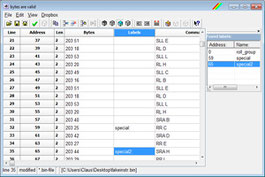
... browse through list of labels ... (sortable by addresses or names)

... insert bytes and produce code that way
Usage
ZX-Assembler is the perfect link between the other ZX-Modules applications, because it contains a powerful assembler, that can compile on the fly using a grid where you can enter assembler commands and you see the resulting byte. It can also produce binary files. ZX-Assembler contains an internal dropbox for files that can be loaded inside the compiler.
-
Edit your Z80 assembler files
-
Open binary files and edit the recalculated assembler code
-
Run your files with your favourite emulator
-
Browse through labels:
When you compile assembler code that has labels, ZX-Assembler builds up a label list. The label list can be toggled and shows all labes. Sort the list by addresses or names. Click on a label to jump to the source code line.
-
File Dropbox:
Create binary files into the Dropbox or directly onto disk. The Dropbox can be used to test the file output of self-made code. Output commands with file names without paths will be stored in the File Dropbox automatically.
available commands
ZX-Assembler understands most of the commands and syntaxes used by the great SJasm assembler. But it has extended commands for special purposes.
| Command | Parameters | Description |
|
# LENGTH FIELD |
[<value>] | same as LENGTH (with structures) of FIELD (outside structures) |
|
## ALIGN MAPALIGN |
[<alignment>] | same as ALIGN (within structures) or MAPALIGN (outside structures) |
| @ | @<Z80 instruction> | Ensures that the Z80 instruction is used, if a macro with same name exists |
| <cnt> | <loop count><commands> | repeats the following line of commands. LIne repeater can be nested simply by attaching them next to each other. The loop counter can be evaluated with function % (first level), %% (second level), etc. |
| [<cnt>] | [<loop count>]<commands> | repeats the following line of commands. LIne repeater can be nested simply by attaching them next to each other. The loop counter can be evaluated with function % (first level), %% (second level), etc. |
| <macro name> | [<parameter list>] | calls the macro <macro name> and may expect parameters to be attached. The code is inserted as it is, including labels. So, macros may contain code fragments, e.g. open loops etc. There may be different macros with same name, but in that case they must differ in count of parameters. Parameters can be single values or bracketed lists (e.g. (89,90)) and may be seen as only one parameter by the macro processor |
| <structure name> | [<replace values>] | calls the structure <structure name>. If a label is placed before that call, there are sub-labels created for that label. In that case, the data that has been defined in the structure is generated. If <replace values> are used, the default values of the data definitions are replaced by those values in the same order as defined in the structure. |
| ABYTE | <offset>, <byte or string sequence> | same as BYTE, but all bytes or strings are incremented by <offset> |
| ABYTEC | <offset>, <byte or string sequence> | same as BYTEC, but all bytes or strings are incremented by <offset> |
| ABYTEZ | <offset>, <byte or string sequence> | same as BYTEZ, but all bytes or strings are incremented by <offset> |
| ALIGN | <alignment> [, <fill byte>] | Aligns the memory position to fit exactly to <alignment>. The skipped space can be filled with the optional <fill byte> instead of zero bytes. |
| ASSERT | <condition> [, <alternative string>] | if condition gives 0, an assertion message will be output. If an alternative text message is given, it is displayed instead of the default message. |
| ASSIGN | <identifier> [,] <expression> | creates a defintion <identifier> in the definition list with value <expression> |
|
BLOCK DS DEFS |
<count> [, <fill value>] | results a group of <count> bytes as a filler. Default for <fill value> is 0. Same as DS and DEFS. |
| BLOCKSTART | <start address> | necessary for block editing; sets the start address of the destination data block to the given address. Includes an ORG <start address> |
| BREAK | - | breaks a WHILE or REPEAT loop. |
|
BYTE DB DEFB DM DEFM |
<byte or string sequence> | results a byte or group of bytes. Same as DB, DEFB, DM and DEFM. |
|
BYTEC DEFC |
<byte or string sequence> | results a byte or group of bytes, where each string (not single bytes) ends with a byte with bit 7 set. Same as DC and DEFC. |
|
BYTEZ DZ DEFZ |
<byte or string sequence> | results a byte or group of bytes, where the whole sequence is followed by a zero byte. Same as DZ and DEFZ. |
| CODE | [?] , [@ <address or address range> ] , [# <alignment>] , [PAGE <page or page range>] | not yet implemented |
| CONTINUE | - | continues a WHILE or REPEAT loop and skips the following instructions until the ENDWHILE / ENDREPEAT |
| DEFINE | <identifier> [,] <replacement> | defines a definition in the definition list, which can have a replacement. If a replacement is given, the identifier is replaced by it. Also strings with an introducing @ (e.g. @"test") will be replaced. |
| DEFPAGE | <page or page range> [, <origin> [, <size> ] ] | not yet implemented |
|
DEPHASE ENT ENDT |
- | restores the old address counter, remembered by PHASE. Same as UNPHASE, ENT and ENDT. |
|
DISPLAY |
<strings and numbers> | adds an entry to the display output box. You may format the output of numbers with special switches outside strings: /A for both, decimal and hexadecimal, /D for decimal and /H for hexadecimal. Strings, numbers, expressions or the mentioned switches must be separated by comma. |
|
DISPLAY CLEAR |
- | clears the display output box |
|
DWORD DD DEFD |
<dword or dword sequence> | resultsa dword or group of dwords (dword = 32 bit integer). Same as DD and DEFD. |
|
ELSE |
- | begins the ELSE block of an IF..ELSEIF..ELSE..ENDIF structure. |
|
ELSEIF |
<condition> | same as ELSE and following IF |
|
ELSEIFB |
<macro parameter> | same as ELSE and following IFB |
|
ELSEIFDEF |
<identifier> | same as ELSE and following IFDEF |
|
ELSEIFDIF |
<macro param 1>,<macro param2> | same as ELSE and following IFDIF |
|
ELSEIFDIFI |
<macro param 1>,<macro param 2> | same as ELSE and following IFDIFI |
|
ELSEIFEXISTS |
<file name> | same as ELSE and following IFEXISTS |
|
ELSEIFIDN |
<macro param 1>,<macro param 2> | same as ELSE and following IFIDN |
|
ELSEIFIDNI |
<macro param 1>,<macro param 2> | same as ELSE and following IFIDNI |
|
ELSEIFNB |
<macro parameter> | same as ELSE and following IFNB |
|
ELSEIFNDEF |
<identifier> | same as ELSE and following IFNDEF |
|
ELSEIFNEXISTS |
<file name> | same as ELSE and following IFNEXISTS |
|
ELSEIFNNUM |
<macro parameter> | same as ELSE and following IFNNUM |
|
ELSEIFNSTR |
<macro parameter> | same as ELSE and following IFNSTR |
|
ELSEIFNUM |
<macro parameter> | same as ELSE and following IFNUM |
|
ELSEIFSTR |
<macro parameter> | same as ELSE and following IFSTR |
|
END |
- | stops the assembling and ignores all following instructions |
|
ENDIF |
- | closes an IF..ELSEIF..ELSE..ENDIF structure |
|
ENDMACRO ENDM |
- | closes a macro definition. Same as ENDM |
|
ENDMAP |
- | closes the current map counter and restores the previous one (if any) |
|
ENDMODULE ENDMOD |
[<module name>] | when no module name is given, the current module is closed. When a module name is given, all last defined modules up to and including the given module name will be closed. Same as ENDMOD |
|
ENDREPEAT EDUP ENDR |
- | closes a REPEAT loop. REPEAT loops can be nested, but not overlap. Same as EDUP and ENDR |
|
ENDSTRUCT ENDS |
- | closes a STRUCT structure macro definition. Same as ENDS |
|
ENDWHILE ENDW |
- | closes a WHILE loop. WHILE loops can be nested, but not overlap. Same as ENDW. |
|
EQU = |
<address> | Sets the preceding label to the value. Same as = |
|
EXECUTE |
<file name> | executes the file on disk |
|
EXPORT |
<label> | not yet implemented |
|
FIELD # |
[<increment>] | Sets a label to the value of the current map counter and increments the map counter by <increment>. Same as # (outside of structures) |
|
FPOS |
<position> | Sets the file pointer of the current output file to the value |
|
IF |
<condition> | Starts an IF structure, that may consist of IF..ELSEIF..ELSE..ENDIF. If <condition> is zero, the next ELSE or ELSEIF is executed. |
|
IFB |
<macro parameter> | Same as IF, but results true, if the macro parameter is empty. |
|
IFDEF |
<identifier> | Same as IF, but results true, if the <identifier> has been defined by DEFINE |
|
IDEFINE |
<identifier> [,] <replacement> | Same as DEFINE, but case-insensitive version |
|
IFDIF |
<macro param 1>, <macro param 2> | Same as IF, but results true, if both macro parameters are not identical (case-sensitive) |
|
IFDIFI |
<macro param 1>, <macro param 2> | Same as IF, but results true, if both macro parameters are not identical (case-insensitive) |
|
IFEXISTS |
<file name> | Same as IF, but results true, if file exists on disk or in the file dropbox |
|
IFIDN |
<macro param 1>, <macro param 2> | Same as IF, but results true, if both macro parameters are identical (case-sensitive) |
|
IFIDNI |
<macro param 1>, <macro param 2> | Same as IF, but results true, if both macro parameters are identical (case-insensitive) |
|
IFNB |
<macro parameter> | Same as IF, but results true, if the macro parameter is not empty |
|
IFNDEF |
<identifier> | Same as IF, but results true, if the <identifier> has not been defined with DEFINE |
|
IFNEXISTS |
<file name> | Same as IF, but results true, if file does not exist on disk nor in the file dropbox |
|
IFNNUM |
<macro parameter> | Same as IF, but results true, if the macro parameter is not numeric |
|
IFNSTR |
<macro patameter> | Same as IF, but results true, if the macro parameter is not a string |
|
IFNUM |
<macro parameter> | Same as IF, but results true, if the macro parameter is numeric |
|
IFSTR |
<macro parameter> | Same as IF, but results true, if the macro parameter is a string |
|
INCBIN BINARY INSERT |
<file name> [, <offset>] [, <length>] | Includes the content of a binary file from <offset> with <length> bytes. <offset> and <length> are optional. File must be on disk or in the file dropbox. Same as BINARY and INSERT |
|
INCHOB |
<file name> [, <offset>] [, <length>] | Includes the content of a hobeta disk file from <offset> with <length> bytes. <offset> and <length> are optional. File must be on disk or in the file dropbox. |
|
INCLUDE |
<file name> | Includes the assembler code of the given file. I is red before the assembler starts its code iteration. So, including a file is exactly the same as if the content would be entered directly |
|
INCTRD |
<TRD file name> , <inner file name> [, <offset>] [, <length>] | Includes the content of an <inner file name> inside a <TRD file> from <offset> with <length> bytes. <offset> and <length> are optional. The TRD file must be on disk or in the file dropbox |
|
LENGTH # |
<length> | Used only within STRUCT definitions and outputs <length> zero bytes. Same as # |
|
MACRO |
<name> [<parameter> [ = <default>]] [<parameter count>] [<parameter range>] | Defines a macro that can later be called simply by using its name. Optional parameters can be named identifiers and followed by optional numbered parameters. Named parameters can be used directly with their names, while numbered parameters can be accessed with @<number> function. |
|
MAP |
<value> | Creates a new map. Use FIELD to set labels to current map counter. Use ENDMAP to close the current and restore the previous one |
|
MAPALIGN ## |
[<alignment>] | Aligns the map position to <alignment>. Default value is 4. |
|
MODULE |
<module name> | Defines a new module that bases on previous modules. Labels are local to the current module |
|
ORG |
<address> | Sets the address counter to a new value |
|
OUTPUT |
<file name> [, <mode>] | Loads the content of the file, if it exists on disk or in the file dropbox, If the file is not present, it will be created. You may use mode T (= default) to clear the file, R to rewind to position 0, or A to append code to the end of the file |
|
PAGE |
<page or page range> | not yet implemented |
|
PHASE DISP TEXTAREA |
<address> | Remembers the current address and sets origin address <address>. Same as TEXTAREA and DISP. |
|
REPEAT DUP REPT |
<loop count> | Together with ENDREPEAT starts a REPEAT loop. REPEAT loop can be nested, but not overlap. Same as DUP and REPT. The loop counter can be evaluated with function @# (first level), @@# (second level), etc. |
|
ROTATE |
<value> | Rotates the numerated parameters of the current macro to left, if value is >0, or to right, if value is <0. The rotation of parameters is circular. |
|
SIZE |
<minimum file size> | Ensures the current output file has the <minimum file size>. It does not change the FPOS file position. |
|
STRUCT |
<name> [, <initial offset> [, <alignment>]] | Defines a data structure. Creates a label <name> containing length of structure, as well as sub-labels containing the offsets of defined fields. A structure can be used with a preceding label, which defines corresponding sub-labels and sets the fields to the defined values or default values. A structure call without a preceding label just creates the data. Only define commands, ALIGN (##) and LENGTH (#) are allowed within structures. |
|
TRIPLE DT DEFT D24 DEF24 |
<triple or triple sequence> | Results a triple or group of triples (triple = 24 bit integer). Same as DT, D24, DEF24 and DEFT. |
|
UNDEFINE |
<identifier> | * | If <identifier> is given, it's erased from the definition list. If * is used, all definitions are cleared. Even the pre-defined ones. |
|
VAR = |
<address> | Sets the preceding label to the value. Same as = |
|
WHILE |
<condition> | Together with ENDWHILE starts a WHILE loop. WHILE loops can be nested, but not overlap. The loop counter can be evaluated with function @# (first level), @@# (second level), etc. |
|
WORD DW DEFW |
<word or word sequence> | Results a word or group of words (word = 16 bit integer). Same as DW and DEFW. |
|
XDEFINE |
<identifier> [,] <replacement> | Same as DEFINE, but the replacement already is expanded at definition |
|
XIDEFINE |
<identifier> [,] <replacement> | Same as XDEFINE, but case-insensitve version |
AVAILABLE EXPRESSION FUNCTIONS
ZX-Assembler uses a powerful self-created term evaluator that supports many of the functions available in SJasm, but also necessary functions for ZX-Spectrum related operations.
| Symbol: | Usage: | Result: | Description: |
| - | - <number> | int/float | gives the negative value of <number> |
| - | <num1> - <num2> | int/float | gives the difference of <num1> minus <num2> |
| ! | <number> ! | float | gives the faculty of <number>. = FACT <number> |
| ! | ! <number> | integer | logical NOT. Gives -1, if <num> is 0, otherwise 0. |
| != | <num1> != <num2> | integer | gives -1, if <num1> is unequal to <num2>, otherwise 0 |
| $ | $ | integer | gives the current address value |
| % | <num1> % <num2> | integer | gives the modulo of <num1> / <num2> |
| % | % | integer | gives the current loop counter of the line repeater. Use % to get the counter of the rightmost line repeater. %% for the second level, %%% for the third and so on. |
| & | <num1> & <num2> | integer | binary AND. Gives the result of binary AND operation of both numbers. |
| && | <num1> && <num2> | integer | logical AND. Gives -1 if <num1> and <num2> are both <>0, otherwise 0. |
| * | <num1> * <num2> | int/float | gives the product of <num1> times <num2> |
| ** | <num1> ** <num2> | int/float | gives the power of <num2> to base <num1> |
| / | <num1> / <num2> | float | gives the quotient of <num1> through <num2> |
| ? | ? (<cond> , <num1> [, <num2>] ) | int/float/ string | gives <num1>, if condition <cond> is true, otherwise <num2>. If <num2> is ot given, the result is 0, if <cond> is not true. |
| @ | @<number> | int/float/ string | used within macro definitions. If <number> is 0, the result is the count of numbered parameters. In case of 1..n it resuls the value of the numbered parameter |
| @ | @<string> | string | includes the result of the string to the definition replacement procedure |
| @# | @# | integer | gives the current loop counter of repeat or while loop. @# gives the counter of the topmost loop level, @@# the second level, @@@# the third, and so on. |
| ^ | <num1> ^ <num2> | integer | binary XOR. Gives the result of binary XOR operation o both numbers. |
| | | <num1> | <num2> | integer | binary OR. Gives the result of binary OR operation of both numbers. |
| || | <num1> || <num2> | integer | binary OR. gives -1 if <num1> or <num2> is <>0, otherwise 0. |
| ~ | ~ <number> | integer | binary NOT. Reverses all bits of <number> |
| + | + <number> | int/float | gives <number> (does nothing) |
| + | <num1> + <num2> | int/float | gives the sum of <num1> plus <num2> |
| < | <num1> < <num2> | integer | gives -1 if <num1> is less than <num2>, otherwise 0 |
| <? | <num1> <? <num2> | int/float | gives the lowest value of both numbers |
| << | <num> << <count> | integer | gives <num> bitwise shifted to left |
| <= | <num1> <= <num2> | integer | gives -1 if <num1> is less than or equal to <num2>, otherwise 0 |
| <> | <num1> <> <num2> | integer | gives -1 if <num1> is unequal to <num2>, otherwise 0 |
| = | <num1> = <num2> | integer | gives -1 if <num1> is equal to <num2>, otherwise 0 |
| == | <num1> == <num2> | integer | gives -1 if <num1> is equal to <num2>, otherwise 0 |
| => | <num1> => <num2> | int/float | gives the result of <num1> * 256 + <num2> |
| > | <num1> > <num2> | integer | gives -1 if <num1> is greater than <num2>, otherwise 0 |
| >= | <num1> >= <num2> | integer | gives -1 if <num1> is greater than or equal to <num2>, otherwise 0 |
| >> | <num> >> <count> | integer | gives <num> bitwise shifted to right. |
| ° | <degrees> ° | float | gives the radiant value of <degrees>. Same as <degrees> * PI / 180 |
| ² | <number> ² | float | gives the square of <number>. Inverse function of SQR. Same as SQU |
| ³ | <number> ³ | float | gives the cubic value of <number>. Inverse function of CUR. Same as CUB |
| ABS | ABS <number> | int/float | gives the unsigned value of <number> |
| ACS | ACS <number> | float | gives the arcus cosine of <number>. Inverse function of COS |
| AND | <num1> AND <num2> | integer | binary AND. Gives the result of binary AND operation of both numbers |
| ASC | ASC <string> | integer | gives the ANSI code of character in <string>. Inverse function of CHR |
| ASN | ASN <number> | float | givesthe arcus sine of <number>. Inverse function of SIN |
| ATN | ATN <number> | float | gives the arcus tangens of <number>. Inverse function of TAN |
| AVG | AVG (<list of numbers>) | int/float | gives the average value of the numbers. Numbers must be separated by comma |
| BIN | BIN <number> | string | gives the binary result of <number> |
| BIT | BIT (<num>, <start> [, <stop>]) | integer | gives the bit or bit range of <num> |
| CASE | CASE (<index>,<list of numbers and strings>) | int/float/ string | gives the term of the list with index <index>. The first index is 1 |
| CEIL | CEIL <number> | integer | gives the unrounded integer value of <number>, incremented by 1 if fraction value is >0 |
| CHR | CHR <number> | string | gives the ANSI character with code <number>. Inverse function of ASC |
| COS | COS <number> | float | gives the cosine of <number> in the range -1 .. 1. Inverse function of ACS |
| CUB | CUB <number> | float | gives the cubic value of <number>. Inverse function of CUR |
| CUR | CUR <number> | float | gives the cubic root of <number>. inverse function of CUB |
| DIV | <num1> DIV <num2> | integer | gives the integer quotient of <num1> / <num2> |
| EXP | EXP <number> | float | gives the exponent of <number> to base e |
| FACT | FACT <number> | float | gives the faculty of <number>. Same as <number> ! |
| FBYTE | FBYTE <address> | integer | gives a byte from the current OUTPUT file |
| FLOOR | FLOOR <number> | integer | gives the unrounded integer value of <number>, decremented by 1 if fraction value is <0 |
| FNAME | FNAME | string | gives the name path of the current OUTPUT file |
| FPOS | FPOS | integer | gives the current output file position |
| FRAC | FRAC <number> | float | gives the fraction value of <number> |
| FSIZE | FSIZE | integer | gives the length of the current OUTPUT file |
| FWORD | FWORD <address> | integer | gives a 16-bit word from the current OUTPUT file |
| HEX | HEX <number> | string | gives the hexadecimal result of <number> |
| HIGH | HIGH <number> | integer | gives the high byte of 16-bit value <number> |
| IF | IF (<cond>, <num1> [, <num2>]) | int/float/ string | gives <num1>, if condition <cond> is true, otherwise <num2>. If <num2> is not given, the result is 0, if <cond> is not true |
| INT | INT <number> | integer | gives the unrounded integer value of <number> without fraction |
| INTV | INTV (<num>,<min>,<max>) | int/float | gives the number <num>, which is set to <min> if less, or set to <max> if greater, Ensures <num> not to leave the limits. |
| LEFT | LEFT (<string>,<count> | string | gives the left string part with <count> characters |
| LEN | LEN <string> | integer | gives the length od <string> in characters |
| LN | LN <number> | float | gives the logarithmus naturalis of <number> to base e. Inverse function of EXP |
| LOG | LOG <number> | float | gives the logarithmus of <number> to base 10. Inverse function of TEN |
| LOW | LOW <number> | integer | gives the low byte of 16-bit value <number> |
| MAX | MAX (<list of numbers>) | int/float | gives the highest number of the list. Numbers mus be separated by comma. |
| MID | MID (<string>,<pos> [, <count>]) | string | gives a part string of <string> starting at position <pos> and <count> characters. <count> is 1 by default |
| MIN | MIN (<list od numbers>) | int/float | gives the lowest number of the list. Numbers mus be separated by comm |
| MOD | <num1> MOD <num2> | integer | gives the modulo of <num1> / <num2> |
| NEG | NEG <number> | int/float | gives the negative value of <number> |
| NOT | NOT <number> | integer | logical NOT. Gives -1 if <number> is 0, otherwise 0 |
| UNBIN | UNBIN <string> | integer | gives the numeric result of binary number in <string> |
| OR | <num1> OR <num2> | integer | binary OR. Gives the result of binary OR operation of both numbers |
| PI | PI | float | the constant ratio of the diameter and circumference of a circle: 3.1415926... |
| RAD | RAD <degrees> | float | gives the radiant value of <degrees>. Same as <degrees> * PI / 180 |
| RND | RND | float | gives a random number in the range 0 <= RND < 1 |
| SGN | SGN <number> | integer | gives the sign of <number>, means -1 for negative, 1 for positive values or 0 for zero |
| SHL | <num> SHL <count> | integer | gives <num> bitwise shifted to left |
| SHR | <num> SHR <count> | integer | gives <num> bitwise shifted to right |
| SIN | SIN <number> | float | gives the sine of <number> in the range -1 ... 1. Inverse function of ASN |
| SQR | SQR <number> | float | gives the square root of <number>. Inverse function of SQU |
| SQU | SQU <number> | float | gives the square of <number>. Inverse function of SQR |
| STR | STR <number> | string | gives the string result of <number> |
| STR | STR (<num>,<fraction digits> [, <total digits>]) | string | gives the string result with the given fraction digits, expanded to the total digits, if room available |
| SUM | SUM (<list of numbers>) | int/float | gives the sum of the numbers. Numbers must be separated by comma |
| TAN | TAN <number> | float | gives the tangens of <number>. Inverse function of ATN |
| TEN | TEN <number> | float | gives the tenth power of <number>. Inverse function of LOG |
| UNHEX | UNHEX <string> | integer | gives the numeric result of hexadecimal number in <string> |
| VAL | VAL <string> | int/float | calculates the numeric result in <string>. May contain another formula |
| XOR | <num1> XOR <num2> | integer | binary XOR. Gives the result of binary XOR operation of both numbers. |
| _VERSION | _VERSION | string | gives the current version of ZX-Assembler as string |
| _APPPATH | _APPPATH | string | gives the path of the associated application |
| _APPFILE | _APPFILE | string | gives the name of the associated application |
| _TMPPATH | _TMPPATH | string | gives the system temporary file folder |
| _ZXAPATH | _ZXAPATH | string | gives the current execution path of ZX-Assembler |
LIST OF CHANGES
| Date: | Description of changes: |
| Jun. 2015 | New program version 0.8 published |
| Max 2015 | Implementing column toggle window, BLOCKSTART instruction, that is necessary for data block editing, functions to insert ASM files or binary data at cursor position, optimized function for editing bytes |
| 2014-2015 | Implementing the full or nearly full command set of SJasm and SJasmPlus. Implementing the drop box which can be used for all commands that perform file accessing, if no path os given. |
| May 2013 | Completing a way of editing the assembler code within a string grid. I added some features for inserting and deleting lines. |
| Nov. 2012 | Creating a new application |
downloading zx-assembler for windows (7, 8, 10, 11)
ZX-Assembler v0.8
