
ZX-Editor 2nd edition
version 2.3.1
WELCOME BACK 2025
powerful word processing tool with Spectrum Basic and Beta Basic features, including syntax checking and direct datablock editing.
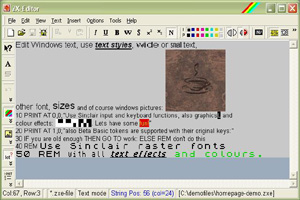
edit your text with many text effects ...
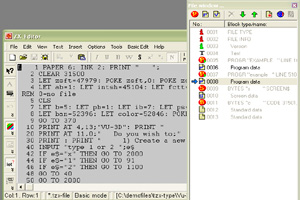
edit BASIC programs directly ...
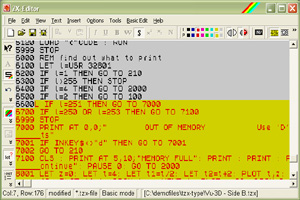
use ZX-Spectrum colour effects ...
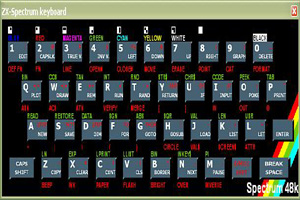
virtual keyboard helps with tokens ...
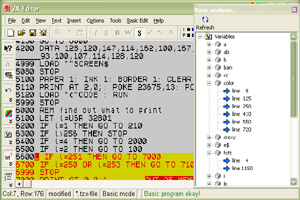
list all variables of your Basic program ...
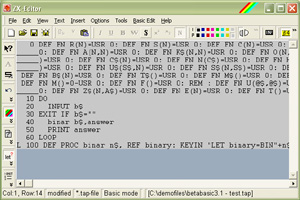
create and edit Beta Basic programs ...
usage
ZX-Editor is a text editor for ZX-Spectrum emulator files, which supports (nearly all) functions you know from other text editors, and also Spectrum-related things like colour attributes, flashing, screen$-files etc. You also can change the text style (italic, bold etc.) as well as text height. But also 8x8-pixels fonts are supported.
You also can write Sinclair Spectrum Basic and Beta Basic programs with ZX-Editor. It supports a full syntax checking and keyword handling routines.
ZX-Editor is a useful tool for the ZX-Modules project, which consists of many individual and helpful programs.
features
- Load and edit original ZED files (including 8x8 raster fonts support and inline graphics).
- Load text files and ASCII files and save them back.
- Use all Windows font sets in all available sizes - the program shows you what sizes are supported. You can mix Sinclair raster fonts (with 2048 bytes size) and normal Windows text together. Used raster fonts are stored inside the ZX-Editor files (as it was in the old ZX-Editor).
- You can set any of the ZX-Spectrum colours and effects (including BRIGHT and FLASH), and you have all text styles (pretty much like in the old ZX-Editor), but also small text.
- Enter original ZX-Spectrum Basic programs, supporting 48k, 128k and Beta Basic versions 3 and 4 with full cursor and token support - also block graphic characters are displayed correctly. In any token mode, the Shift key of your PC works as Speccy Caps Shift and the Ctrl key of the PC works as Symbol Shift. Also entering keywords with single chars is possible, also terms like for n=1to10step.2 are transformed into tokens correctly.
- Load and edit Basic blocks from and write them back to TAP/TZX/DSK files.
- Use the window clipboard to copy, cut or paste any of the editor area to another ZX-Editor window. You also may copy text to other windows applications as pure text.
- Insert complete graphic files (BMP/JPG/GIF) or any of the ZX-Spectrum files into your editor area. SCR files and graphic files are displayed directly; other Spectrum files will display one of their picture or screen datablock.
- Multi-datablock editing helps you to edit all Basic, Ascii or ZED files inside TZX, TAP or DSK files at once.
- Insert any of the 256 characters into your text (old ZX-Editor allowed only characters up to #32).
- Context help which makes this homepage much easier.
- Special character insert dialog.
- Search and replace text, locate objects and items
- Undo and redo function
- DSK file support.
- BASin file support
- BASIC analysis (displaying all variables, Beta-Basic procedures)
- For Multi-datablock editing, now the complete (!) datablock composer of ZX-Blockeditor is implemented. You can edit or create any supported datablock.
- Individual numerator groups can be set.
- Fully customizable print preview dialog. You can print all files now.
- Variables and Procedures analysis
- Use CHX files (big font files) that can store big letters with colours (can be created with ZX-Paintbrush).
- ZXP- and SEV (SevenUp) files can be imported and displayed correctly.
- ZXB-file support (ZX-Modules meta files)
- TRD, SCL and Hobeta file support (TR-DOS disks)
- ZX-Editor Second Edition version now can be used as direct editing dialog within ZX-Blockeditor (v.2.0).
- Edit SCREEN$ datablocks with ZX-Paintbrush (>= v.2.0) running inside a dialog window.
- Syntax helper that appears if the cursor stands close to a keyword (works also with BetaBasic programs)
list of changes
| Date: | Description of changes: |
| Jan. 2015 | New program version 2.3.1 published. |
| Jan. 2015 | Ctiles and btiles now can be edited with the "edit with ZX-Paintbrush" feature within ZX-Blockeditor and ZX-Editor Second Edition. |
| Jan. 2015 |
By default, TZX groups now are loaded into one meta block, which contains the group as sub-blocks. The user can explode meta blocks to get all sub.blocks listed. This behaviour can be toggld with an option in the options dialog. ZXM file support added. |
| May 2014 |
New program version 2.3 published |
| Jan. 2013 |
New program version 2.2 published |
download zx-editor se for windows (7, 8, 10, 11)
ZX-Editor Second Edition v.2.3.1
