

ZX-Explorer
version 2.1
WELCOME BACK 2025
powerful file browser and thumbnail viewer for ZX-Spectrum related files and archives.

use it as a file explorer ...

... but also as a thumbnail viewer!
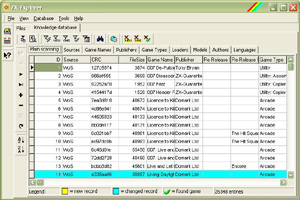
manage known Spectrum programs ...

explore compressed files as well ...
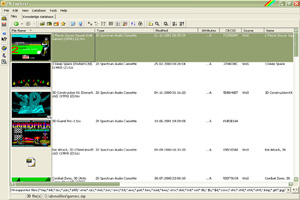
thumbnails & game information ...

batch renaming by game data ...
usage
ZX-Explorer is a file explorer for ZX-Spectrum emulator files, which supports (nearly all) functions you know from Windows explorer, but it also helps you to administrate your Spectrum program collection by using the great and powerful file archive database from World of Spectrum. ZX-Explorer is also a multi-functional Thumbnail viewer for your Spectrum files.
ZX-Explorer is a useful tool for the ZX-Modules project, which consists of many individual and helpful programs.
features
- Browses through your hard-disks, CDs or something else where you have stored ZX-Spectrum files.
- Uses virtual file display (file information within folders is determined 'on the fly').
- Displays normal files as well as the contents of compressed files.
- You also get an automatic program/game detection of your files, if you want. It tells you the name of the program, the publisher etc. The detection works with data from World of Spectrum file archive, which is kindfully supported by Martijn van der Heide. He publishes regular updates as a downloadable DAT file with which you can keep ZX-Explorer's built-in program/game database up-to-date.
- The built-in program/game database stores known games and programs that were found on your computer while browsing through the files. You later can run or locate these games and programs directly from the Knowledge database register tab!
- Compressed files can be quick-scanned for game data directly. The first found game in the compressed file is displayed as a 'preview' file. This helps all people who have many compressed games on their machine and don't want to look inside all of these compressed files separately.
- ZX-Explorer can open a file or a compressed file with ZX-Blockeditor and ZX-Preview. Use the features that are available in the options dialog.
- ZX-Explorer became also a powerful thumbnail picture viewer, which displays your files as small images - in this mode you also get the first file that is inside a compressed file displayed directly!
- You may download missing files from World of Spectrum Archive directly - your Knowledge database marks all found games with a green hook. Not found games get a red cross icon instead.
- ZX-Explorer allows you to rename, delete, copy or move your files, pretty much as in other file explorers. You may also use drag-and-drop to copy files to another file explorer, and ZX-Explorer can receive dropped files, as well.
- ZX-Explorer has an included batch renaming tool, with which you can rename multiple files on your hard disk by their game information!
list of changes
| Date: | Description of changes: |
| Jan. 2015 | New program version 2.1 published |
| Jan. 2015 |
Bugfix: The tool "Scan for known games in folders" could not be interrupted with the <ESC> key, as promised. The key recognition worked, but
the scan did not stop.
Bugfix: The file term display produced problems when thumbnails or in-zip-data-search is used. The item display currupted. To resolve the problem, I
had to completely renew the item display routines. Thumbnails as well as in-zip-game info is now displayed time-delayed and do not longer disturb the list scrolling and item
displaying. When switching from knowledge database to the file list tab and then back, it's now ensured that the last displayed database recd will be visible again. |
| Feb. 2013 |
New program version 2.0.0.1 published |
| Feb. 2013 |
New program version 2.0 published |
| Jul. 2009 |
New program version 1.2.1.0 published |
download ZX-Explorer for windows (7, 8, 10, 11)
ZX-Explorer v.2.1

a ready-to-use Knowledge Database (zipped) only for new users!

referred and recommended tools
ZX-Favourites
