
ZX-Paintbrush
version 2.6.1
WELCOME BACK 2025
a powerful graphics tool especially for ZX-Spectrum SCREEN$, taking care the attribute limitations, nonetheless endless features for your graphic design
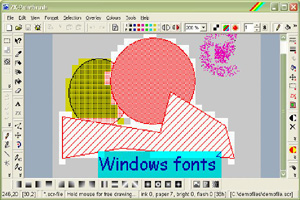
draw ZX-Spectrum pictures ...
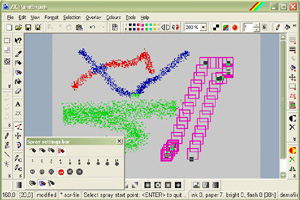
... use different spray effects ...
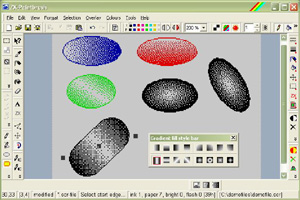
... gradient and standard fillings ...
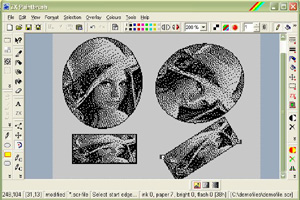
... custom graphics fillings.
usage
You can load existing or create new SCR (screen files), draw images with mouse-sensitive
tools like circles, rectangles, polygons etc. You have different fill styles available in tool boxes and you can alter the colour attributes very easily. Also, transparent colour effects are
available here. You can also convert your BMP/JPG/GIF files with this tool, and if you want, you can hold the pictures in this format. ZX-Paintbrush converts the pictures in a Spectrum-compatible
form, respecting the colour attributes and hardware limits of this machine. You also can produce exports to SCR files or to ZX-Editor's ZED files; right now, ZX-Paintbrush is the only connection
to the old ZX-Editor. Also TAP and TZX files can be created including headers.
Now, ZX-Paintbrush also can be used as a font editor for sinclair fonts (using 256 characters) with either 4x8, 6x8 or 8x8 (standard) pixels. You can read/write corresponding font files (with
2048 bytes of size each) CH4, CH6, CH8 or CHR and also CHX files directly.
ZX-Paintbrush also appears as a dialog within ZX-Blockeditor, if needed to edit screen blocks.
features
-
Circles, triangles, ellipses, rectangles, polygons, parallelograms and rounded rectangles with different fill styles
-
Windows fonts can be drawn also in 4 different directions with shading and contour effects.
-
Spraycan and Floodfill tools; now, the floodfill also can have special filling styles.
-
Raster moving can be set to any distance (makes easy exact drawing)
-
Filling with colour attributes is possible
-
Mirroring, rolling, scrolling and inverting tools for whole screen and for selections
-
Freehand tool
-
Display with different zoom levels
-
Transparent colour effects possible
-
import interface for BMP/GIF and JPG pictures, with conversion dialog, where you can adjust the picture brightness, contrast and size.
-
export interface for ZED, TAP, TZX and SCR files.
-
full clipboard support - internal clipboard (as ZXP file format) for transfers from one ZX-Paintbrush to another; also Windows clipboard paste function
-
transparent and coloured overlay graphics can be handled; useful for clipboard functions as well as copying graphics from one place to another.
-
special font editor view for CH4, CH6, CH8 or CHR files, including key recognization and indication of the corresponding letter.
-
rotations of overlay images in 4 different directions.
-
Sinclair text editor for different sizes and supporting 3 different font types (for 4x8, 6x8 and 8x8 sizes); also shading and contour effects.
-
'Multi block editing' mode now allows you to change all SCREEN$ blocks of TAP and TZX files at once. As you may expect, you have a file list view from which you can select the compatible datablocks. Simply change from one SCREEN$ to another by clicking the blocks in the file view. You also can convert from TAP format to TZX format and vice versa very easily now.
-
ZX-Paintbrush now can receive SCREEN$ blocks from ZX-Blockeditor.
-
ZX-Paintbrush now can send the current picture in the editor to ZX-Blockeditor's clipboard. There, it can be easily pasted from.
-
SEVenUp-file support
-
CHX big font file support (for usage in ZX-Editor Second Edition). CHX font editing now works on a character map where you can edit all characters together. Create new CHX files and fill them with any Windows font. Set free areas left or right on each character to make it smaller using the new "shader" tool.
-
ZXB file support (ZX-Modules meta files)
-
ZX-Paintbrush can be used as direct editing dialog within ZX-Blockeditor (v.2.0).
-
Edit Basic and variables datablocks with ZX-Editor Second Edition (>= v.2.0) running inside a dialog window.
-
Display icons, dialogs and texts in 3 different sizes (for larger screens)
-
Edit colour attributes directly with the new tool "free attributes".
-
Load or edit ULAPlus palettes.
-
ZX-Paintbrush now can handle Timex SCREEN$ (if you want with ULAPlus support) and edits Bifrost*ColorTiles.
-
Map editing support
list of changes
| Date: | Description of changes: |
| Jan. 2015 | New program version 2.6.1 published |
| Jan. 2015 | Ctiles and btiles now can be edited with the "edit with "ZX-Paintbrush" feature within ZX-Blockeditor and ZX-Editor SE |
| Dec. 2014 | New program version 2.6 published |
| Oct. 2014 | New program version 2.5.1.2 published |
| Sep. 2014 | New program version 2.5 published |
| Apr. 2014 | New program version 2.4.0.1 published |
| Apr. 2014 | New program version 2.4 published |
| Nov. 2013 | New program version 2.3.9 beta published |
download ZX-Paintbrush for windows (7, 8, 10, 11)
ZX-Paintbrush v2.6.1

referred and recommended tools
Image2ULAplus
